ACTION / BROWSER PROJECT
GTA Vice City in browser
joncodeofficial's unofficial Vice City frontend requires a game.tar.gz import. We inspected the file stop and local-save interface without downloading game data or launching a scene.
joncodeofficial.github.io
At a glance
- Game files
- Your own legitimate game data required
- Controls
- Controls not confirmed
- Account
- No sign-in in checked entry
- Mobile gameplay
- Not tested
- Full session
- Not tested
- HTTP link check
- HTTP 200; 0 redirects (2026-10-15)
Basis: project instructions and limited desktop entry observation. Observations: Oct 15, 2026. Conditions organized: October 15, 2026.
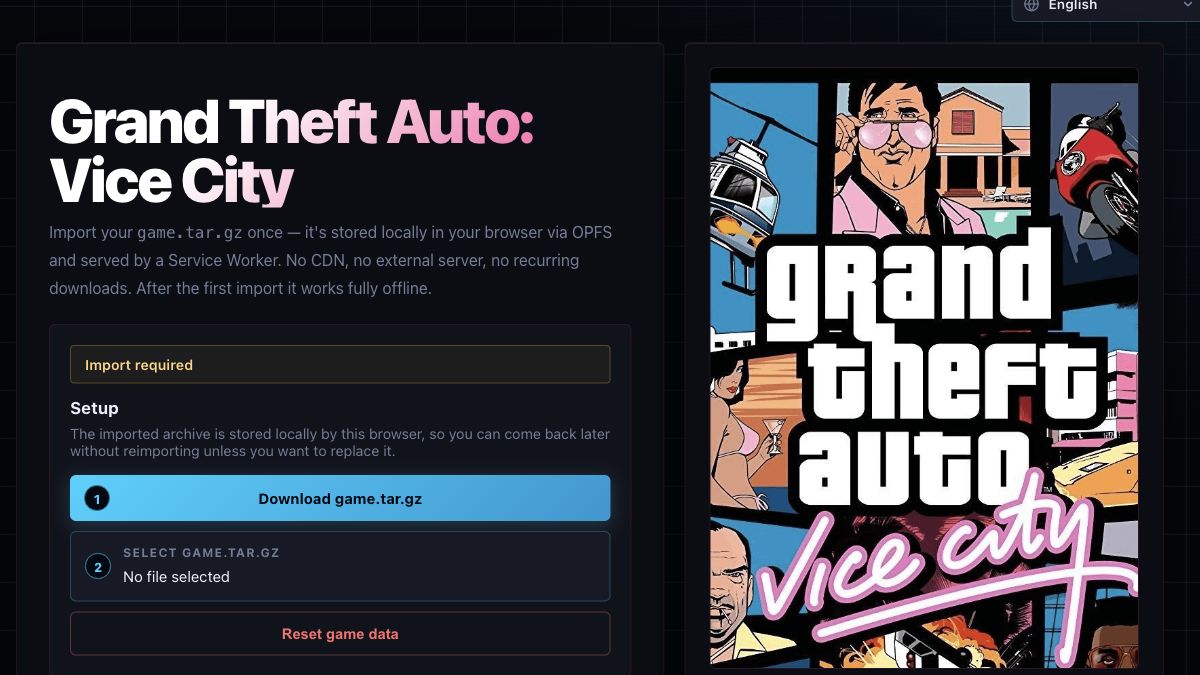
Import required and a disabled Start to play were observed without signing in. No archive was supplied or downloaded. Language selection and Saves expansion responded, not gameplay controls. Later access, storage persistence, saves and mobile play are unknown.
Source & instructions (opens in a new tab)Project type: Browser port
The maintainer identifies a Vice City WASM frontend based on reVCDOS and documents PC .b saves and a required game archive. Only the setup stop was checked, not gameplay or file compatibility.
Classification organized October 15, 2026 from the recorded source and check notes; not a new gameplay test.
Compare classic browser portsBefore you open it
- Legitimately usable Vice City game data in the exact archive format requested by this project; this directory provides none
- The source describes WebAssembly, OPFS and Service Worker support; compatibility was not independently tested
- Import, saved-game and reset controls concern external browser data; do not treat Reset game data as a harmless refresh
Getting started
- Open the original frontend and read its own-copy disclaimer and current import requirements.
- Check the maintainer's repository before preparing any data you have the right to use. We did not test an archive conversion or follow the supplied archive-download link.
- Without a selected archive, our entry stayed at Import required and Start to play remained disabled. Do not treat this setup screen as a running Vice City session.
What we checked
On October 15, 2026, the original entry showed Import required, a game.tar.gz selector, No file selected and a disabled Start to play button. Switching its language to English and expanding Saves worked; eight empty slots and PC .b/.zip import instructions appeared. We did not use the archive download link, select or upload files, reset data, enable cheats or start gameplay. The disclaimer requires a legitimate owned copy. No account or payment prompt appeared before the file requirement. Offline loading, OPFS persistence, saves, controls and mobile gameplay were not verified.
Desktop browser · Oct 15, 2026
The source credits joncodeofficial, reVCDOS and its underlying WASM contributors and disclaims affiliation with Rockstar Games or Take-Two Interactive. A visible archive-download link is not a rights-clearance finding or a recommendation from this directory. The source's local-only and offline statements were not verified by an import or a disconnected session.
Current instructions on the original project (opens in a new tab)Independent editorial pick; not attributed to Radiant Optimizer.
Which GTA Vice City project?
This GTA Vice City browser guide identifies joncodeofficial's particular WASM frontend and its linked maintainer repository. It is not a hosted copy of the game on Tab Game Guide, an official Rockstar release or a guide to every Vice City web project. The page's setup showed an explicit import stop, an unselected game archive and a disabled launch button. That is the useful practical boundary: opening the frontend is not the same as loading the game's city or making a playable session available.
On October 15, 2026 we reviewed the English setup and expanded its Saves section without supplying any file. The original page and repository describe browser-local data and offline use, but we did not test either by importing an archive or disconnecting the network. Our guide's publication date is not a verified first release date for the adaptation. The source credits identify its software lineage while the disclaimer requires a legitimately owned copy; neither provides this directory with game files to distribute.
Guide published . Source reviewed . Author release-page publication: Not established. The reviewed frontend and repository did not establish a verified first browser-release date for this guide.
joncodeofficial's original repository and file requirements (opens in a new tab)Six conditions for GTA Vice City in browser
Game files
The entry requests game.tar.gz and remained at Import required with no file selected. Start to play was disabled. Its disclaimer says visitors need their own legitimate Vice City copy. A visible archive-download link was also present, but we did not open it, inspect its contents or establish permission to redistribute the linked data. This guide does not repeat that download as a recommended shortcut. Consult the maintainer's current requirements for data you have the right to use. We did not verify a conversion recipe, archive structure, import duration or compatibility with another edition.
Controls
Changing the frontend language to English and opening its Saves section produced visible interface changes. Those are setup interactions, not movement or other Vice City controls. No game scene was reached, so walking, driving, aiming, controller operation, mouse capture, remapping and touch input remain unverified. The launch button could not be used while the file requirement was unmet. We did not infer a browser key layout from the original PC game or transfer one from another adaptation. The directory therefore keeps its gameplay-input category unknown.
Account
The import interface and save slots were visible without signing in, paying or registering. We did not enter credentials, follow a support community link or inspect later services after a valid import. The account label applies only to reaching this setup stop, not to every linked feature or future website change. A browser-local archive is also separate from a persistent cloud account. We did not test synchronization, identity recovery or sharing, and a directory bookmark stores only this project's identifier rather than a game archive, profile or save.
Mobile gameplay
Not tested. The source describes touch controls, but we did not import data on a phone, open its mobile file picker or test the runtime on a small device. Browser-local storage support, storage capacity and game input are different requirements; seeing a responsive landing page cannot establish all of them. We did not compare graphics hardware, browser versions, fullscreen behavior, memory use or controller pairing. The repository's browser recommendations are documentation, not compatibility certifications from this check. Read the original project's current guidance before expecting a working phone session.
Full session
We supplied no archive and never launched Vice City. No world scene, vehicle, mission, combat, save event or restored session was observed. Expanding Saves showed eight empty slots and instructions for importing PC .b or .zip saves before starting; it did not verify any actual saved-game file. We did not enable cheats, reset browser data, add a skin or overwrite a slot. Those untested controls should not be interpreted as safe generic repair steps. The page's offline statement was not checked by a completed import and a later disconnected launch.
HTTP link check
The specific GitHub Pages entry returned HTTP 200 with zero redirects on October 15, 2026 after temporary TLS connection interruptions were retried without disabling certificate validation. That is the result for the frontend URL, not the repository, archive-download host or every runtime resource. Browser inspection separately established the import-required state and disabled launch button. A successful website response cannot verify a game-data archive or resolve a missing-file requirement. Use the current source instructions and exact visible state instead of treating this historical response as a full gameplay guarantee.
Local storage and reset are separate decisions
The frontend describes importing once into OPFS and serving imported resources through a Service Worker. We record that as the project's design claim, not a verified absence of network requests or proof that an offline game works. Its repository also warns that resetting game data deletes saves and skins; we did not use the reset control. A refresh, reimport, slot replacement and storage reset can have different effects, so do not treat them as interchangeable troubleshooting actions. The Saves interface requested changes before launch and described PC save formats. We did not upload a file, establish storage persistence, export a backup or verify recovery after closing the browser. No archive or user file is stored by this directory.
GOOD TO KNOW
GTA Vice City browser FAQ
Can I play this Vice City browser entry immediately?
Our entry stopped at Import required with no archive selected and Start to play disabled. We did not reach a scene; the source requires suitable game data from a legitimate owned copy.
Does Tab Game Guide provide game.tar.gz?
No. We provide neither that archive nor an unofficial replacement download. A link on the external site is not an independent rights-clearance finding or a download recommendation from us.
Is offline loading or OPFS persistence confirmed?
No. The frontend describes browser-local storage and offline operation, but we imported no data and tested neither a repeat load nor a disconnected session.
What was observed in the Saves section?
Eight empty slots and instructions for PC .b or .zip saves. No save was imported, replaced, exported or restored, and Reset game data was not used.
Are game controls or mobile play verified?
No. Language selection and the Saves disclosure worked in setup, but no game scene, gameplay input, touch controls or full session was tested.