STRATEGY / BROWSER PROJECT
BREACH in browser
An early HTML5 tactical prototype by Daitanfutekina. Open its control guide and field training before treating the three-operator raid map as verified gameplay.
daitanfutekina.itch.io
At a glance
- Game files
- No game files requested at entry
- Controls
- Controls not confirmed
- Account
- No sign-in in checked entry
- Mobile gameplay
- Not tested
- Full session
- Not tested
- HTTP link check
- HTTP 200; 0 redirects (2026-10-14)
Basis: project instructions and limited desktop entry observation. Observations: Oct 14, 2026. Conditions organized: October 14, 2026.
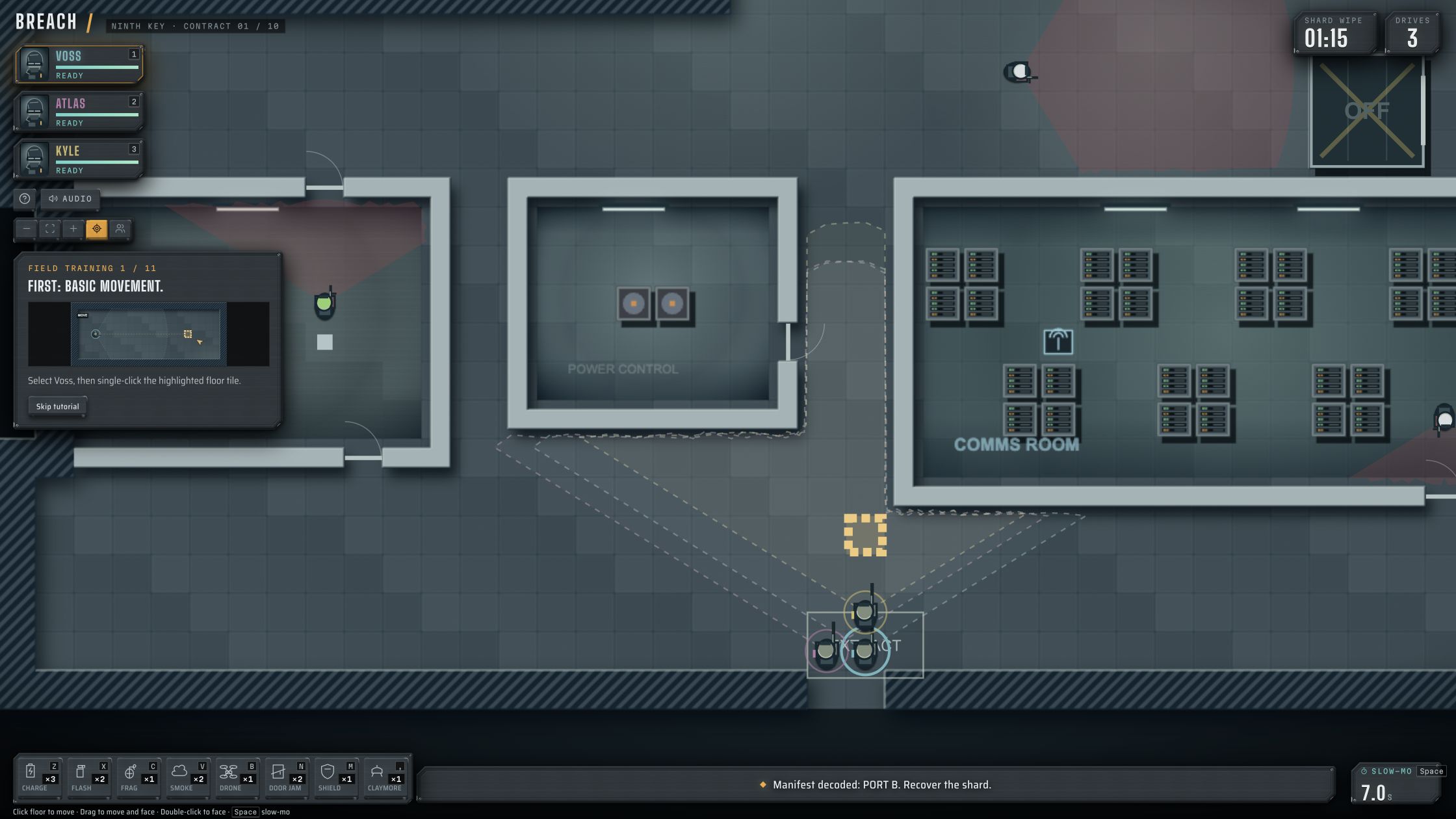
The control menu and three briefing panels responded, and Field Training 1 / 11 loaded without sign-in or own game files. The author documents mouse commands and keyboard shortcuts, but operator movement did not receive confirmation in our check.
Source & instructions (opens in a new tab)Project type: Native browser game
Daitanfutekina publishes BREACH as an original HTML5 tactical prototype with AI assistance disclosed for code, graphics and sounds. The checked demo is not a verified console emulator or port of another BREACH-branded game.
Classification organized October 14, 2026 from the recorded source and check notes; not a new gameplay test.
Before you open it
- Use Run game on Daitanfutekina's original HTML5 release, not an unrelated same-name game
- The author recommends a desktop mouse and fullscreen; map movement was not confirmed here
- Early alpha/demo: later missions, saving and mobile gameplay were not verified
Getting started
- Open the original release and select Run game; wait for the main menu.
- Read Controls, return with Back, then choose New run and follow the three briefing panels.
- Continue into field training and follow the highlighted tile instructions. We reached the map but did not verify movement or complete the training.
What we checked
On October 14, 2026, Run game opened the BREACH menu. Controls displayed the input guide; New run opened three briefing panels, and Continue reached Field Training 1 / 11 with the first map and operator selection. The menu and briefing buttons responded. We attempted a floor command but did not confirm operator movement. No sign-in or user-supplied game files were requested.
Desktop browser · Oct 14, 2026
The author marks the release as a prototype and discloses AI assistance for code, graphics and sounds. This does not establish that every asset or the whole game was generated by AI. Source descriptions of later nights are not evidence that we completed them.
Current instructions on the original project (opens in a new tab)Independent editorial pick; not attributed to Radiant Optimizer.
Which BREACH project?
This BREACH browser guide covers Daitanfutekina's original HTML5 tactical prototype on itch.io. The author calls it an early alpha and a gameplay demo, with unfinished presentation and balance. That scope matters when comparing it with a finished commercial release or another game named Breach. The listing is an original-project entry, not a download mirror or a console-emulator claim.
The author page shows publication on October 14, 2026 at 04:14 UTC and discloses AI assistance for code, graphics and sounds. We read that source and opened the release on the same day. The disclosure is an author statement about production, not evidence of generative gameplay or proof that the entire game was created automatically.
Guide published . Source reviewed . Author release-page publication: (UTC).
Daitanfutekina's original prototype and AI disclosure (opens in a new tab)Six conditions for BREACH in browser
Game files
Run game loaded the project's own browser build and opened its menu without asking us for commercial game data or an installation folder. We did not upload files, install a separate program or use a download mirror. The release still depends on its hosted code and assets. Reaching the menu without user-supplied data is the basis for including it in the no-extra-files-at-entry comparison; that does not verify every later level.
Controls
Controls opened a guide that describes selecting operators, clicking floor tiles for movement, keyboard selection shortcuts and a pause key. The menu and briefing buttons responded to our clicks. After entering field training, we attempted a floor command but did not confirm operator movement, so the directory's control filter keeps this project's gameplay input unconfirmed. The guide is useful source documentation, but it is not a substitute for observing the actual tactical commands work.
Account
The launch, control guide and first training map did not request a sign-in, payment or user-provided game files in our check. The visible Support This Game link is a separate donation path that we did not use. We did not test later account, funding or online features. Our account label describes the checked entry only; it does not claim that every future version or feature is available anonymously.
Mobile gameplay
The author recommends a mouse and fullscreen for this prototype. We checked a desktop browser and did not test touch controls, phone menus or mobile rendering. A top-down map and visible browser URL do not establish a usable phone control scheme. Treat the page as a desktop-oriented launch and documentation guide until a separate mobile session can confirm the commands and interface on an actual device.
Full session
New run led to three briefing panels. Continuing reached Field Training 1 / 11, with operator selection, a floor map and a highlighted first movement tile. We did not complete those eleven training steps, recover the objective, finish a raid or reach later nights. The screenshot is of that first training state. It is not a completion record, a combat result or evidence that the author's complete planned campaign has been verified.
HTTP link check
A separate request to the original itch.io release URL returned HTTP 200 without a redirect on October 14, 2026. That response confirms access to the release page, not successful loading of every embedded asset or responsive tactical gameplay. Our browser check separately reached the menu and first training map. If the iframe is blank or shows an error later, follow the current author instructions; this directory cannot resolve its hosting or prototype bugs.
Read the briefings before the map
The checked startup route was Run game, Controls, Back, New run, then three briefing panels and Continue. Those panels explain the intended commands before the map appears. We did not use a debug menu, skip to a later mission or supply modified game data. Follow the normal tutorial and keep prototype limits in mind. Saving, campaign persistence, recovery after reload and sound settings were not verified, so do not rely on this guide as a save-management walkthrough.
GOOD TO KNOW
BREACH browser FAQ
Which BREACH browser project is linked here?
Daitanfutekina's HTML5 tactical prototype on itch.io. The source marks it as an early alpha/demo, not a finished release or every other game sharing the name.
Do I need owned game data or a separate installation?
The checked menu and first training map opened without user-supplied game files or a separate installation. The browser build still loads its own online assets.
Were the tactical movement controls verified?
No. Menu and briefing controls responded and the first training map loaded, but the attempted floor command did not receive a confirmed movement result.
Is BREACH entirely generated by AI?
That was not established. The author discloses AI assistance for code, graphics and sounds; this is not a claim that all production or gameplay is AI-generated.
Can I play on mobile or finish the full campaign?
Neither mobile gameplay nor a full raid or campaign was tested here. The author recommends a mouse and fullscreen for the prototype.