SPORTS / BROWSER PROJECT
PES 6 in browser
OptiProjects' browser adaptation identifies the PSP edition of PES 6. Our no-commentary start reached a language menu, and the keyboard settings could be inspected; no match was played.
pes6.optijuegos.net
At a glance
- Game files
- No own files requested before language menu
- Controls
- Controls not confirmed
- Account
- No sign-in in checked entry
- Mobile gameplay
- Not tested
- Full session
- Not tested
- HTTP link check
- HTTP 200; 0 redirects (2026-10-15)
Basis: project instructions and limited desktop entry observation. Observations: Oct 15, 2026. Conditions organized: October 15, 2026.
The no-commentary start reached a language menu without an account or own-file prompt. Controles and its keyboard tab displayed mappings, but gameplay keys, a match, gamepad/touch input and save persistence were not tested.
Source & instructions (opens in a new tab)Project type: Browser port
The original OptiProjects entry identifies PES 6 for PSP adapted to the browser. A language menu loaded. The source's recompilation/emulation descriptions do not establish a tested general-purpose PSP emulator.
Classification organized October 15, 2026 from the recorded source and check notes; not a new gameplay test.
Compare classic browser portsBefore you open it
- The entry identifies PES 6 for PSP and loads online assets; no own-file request appeared before the checked language menu
- Its settings describe a roughly 300 MB full-game download option, not a completed transfer measured here
- Keyboard, gamepad, touch and saving options are source-described; gameplay controls and persistence remain unverified
Getting started
- Open the original OptiProjects entry and distinguish game buttons from advertisements.
- For our checked route, choose Jugar sin relatos (Mas ligero), the lighter start without commentary, and wait for runtime and data loading.
- Our visit reached a language menu. Read Controles for the current mappings; X is shown as Cross and Space as Start, but neither was tested in gameplay.
What we checked
On October 15, 2026, Jugar sin relatos (Mas ligero), the no-commentary start, opened the runtime. A game-data progress label showed 10.0 MB before a language menu appeared with English highlighted. The Controles panel and its keyboard tab displayed arrow keys, X for Cross and Space for Start. We did not test those game actions, choose teams or play a match. No account, payment or user-supplied game data was requested before the menu. Advertising interrupted one controls-panel attempt; we dismissed that ad without following its links. Mobile play, saves and online matches were not tested.
Desktop browser · Oct 15, 2026
The website identifies the PSP game and explicitly says it is not affiliated with Konami. We did not establish the implementation as a general-purpose PSP emulator or audit game-data distribution rights. Touch, offline persistence, saved-game imports and online-networking descriptions remain source statements, not verified features. Its live frame counter was not used as a performance benchmark.
Current instructions on the original project (opens in a new tab)Independent editorial pick; not attributed to Radiant Optimizer.
Which PES 6 project?
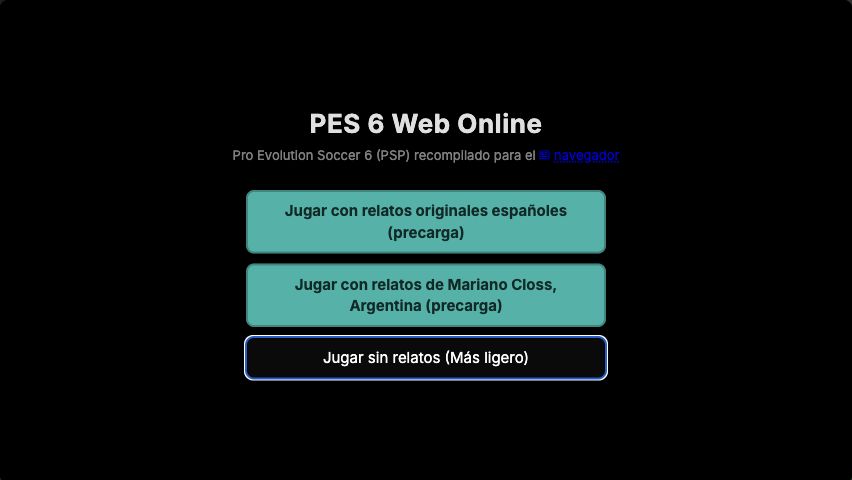
This PES 6 browser guide covers OptiProjects' specific entry at pes6.optijuegos.net. The site identifies Pro Evolution Soccer 6 for PSP, not every PC, console or similarly named football release. Its opening choices offer two commentary packages and a lighter start without commentary. We followed the last option, saw runtime and game-data loading, and reached a language menu with English highlighted. That is stronger evidence than a landing page alone, but it is not a played football match or a verified control setup.
Our desktop check and this guide are dated October 15, 2026. We did not establish when this particular adaptation first appeared. The source describes both browser recompilation and PSP emulation in different sections; we identify its stated source platform without claiming to have tested a general-purpose emulator. Likewise, its interface lists touch, gamepad, saved-game and online features, but those labels are not compatibility results. The distinction between displayed documentation, an opened menu and working match input is retained throughout this page.
Guide published . Source reviewed . Author release-page publication: Not established. The checked OptiProjects entry did not establish this browser adaptation's original publication date.
OptiProjects' original PES 6 entry, controls and requirements (opens in a new tab)Six conditions for PES 6 in browser
Game files
No local disc image, owned-game folder or upload was requested before the checked language menu. Choosing the lighter start still loaded online resources: one progress label showed 10.0 MB while game data downloaded. That value is not a measured complete transfer. The settings separately described an approximately 300 MB full-game download option and a default that downloads during play; we did not enable the full prefetch or measure the whole resource set. This directory hosts none of that data and does not treat the external site's delivery method as an independent rights-clearance finding.
Controls
The Controles interface opened after an intervening advertisement was dismissed. Its keyboard view displayed arrow keys for the directional pad, X for Cross, Space for Start and additional action and stick mappings. We read those assignments without remapping or importing a configuration. We did not use the listed game keys to confirm a language choice, move a player, pass, shoot or pause a match. The gameplay-control category therefore stays unknown. A controls panel responding to a pointer does not establish reliable keyboard, controller or touchscreen operation inside the game.
Account
The original page and the no-commentary route reached the language menu without registration, an email, password, payment or user-supplied game data. We did not create or join an online room, submit chat text, register a profile or inspect every later service. The account label means only that no sign-in was requested along this checked entry path. Advertising and external links are separate from the game's launch controls; we dismissed an interruption without following its links. Anonymous menu access is not a promise about all future multiplayer or persistent-profile features.
Mobile gameplay
Not tested. The source offers on-screen-control settings and describes phone and gamepad play. We did not use a phone, pair a controller, rotate a screen, select a mobile save file or test simultaneous touch actions. A directory page fitting a small display cannot validate the external game's renderer or input. The desktop interface also displayed a live frame counter, but we did not treat it as an independently measured performance result or compare hardware and browsers. Phone compatibility and sustained match performance remain separate open checks.
Full session
We reached the initial language selection, not team selection, kickoff, a score event or a final whistle. No match, tournament, saved game or wireless session was completed. Opening the controls panel did not extend that gameplay scope. The source has separate save and online tabs, but their presence is not a successful import, recovery or connection test. We also did not establish that commentary packages load, that a repeat visit works offline or that cached resources survive browser cleanup. The public screenshot shows launch choices rather than an unplayed match.
HTTP link check
A separate request to the original root URL returned HTTP 200 with no redirect on October 15, 2026, after a transient connection interruption was retried with certificate validation retained. That response is independent of the browser path reaching a language screen. It does not verify every resource, a networking service, a saved-game operation or future availability. If your visit stops at preparation, data loading or a menu, record that exact stage. Do not infer a working match from the homepage response or label a short loading delay a universal outage.
Keep launch choices, ads and online claims separate
The no-commentary choice was our specific route; the two commentary starts were not tested. We observed advertisements and one controls-panel attempt was interrupted by an ad, so visitors should distinguish the project's buttons from external promotions. We do not embed those ads or the external runtime in this directory. The source also contains different descriptions of online networking in its FAQ and update text; we did not reconcile them through a live match and make no claim about peer-to-peer versus relay performance. Its non-affiliation statement identifies the project as independent of Konami, not as an official browser release. Read the current original instructions before choosing a data-intensive mode or importing any save.
GOOD TO KNOW
PES 6 browser FAQ
Which PES 6 browser entry was checked?
OptiProjects' entry at pes6.optijuegos.net, which identifies the PSP edition. The no-commentary start reached a language menu, not a played match.
Does the lighter start avoid all downloads?
No. It omits commentary in the chosen route but still loaded online game data. A progress label showed 10.0 MB; total transfer and the separate roughly 300 MB option were not measured.
Were the keyboard mappings actually played?
No. We inspected the keyboard tab, including arrows, X for Cross and Space for Start, but did not test player movement or match actions. Gameplay controls remain unconfirmed.
Does the checked menu need my own files or an account?
Neither was requested before our language menu. Later online rooms, profiles, save imports and other services were not tested.
Are phone play, saving and online matches verified?
No. Those features are described or exposed by the original site, but we did not test them or complete a football match.