FPS / BROWSER PROJECT
Half-Life in browser
Pixelsuft's separate Xash3D FWGS browser frontend offers memory, storage and ZIP data-source settings. We reached Game Options, not a playable Half-Life scene.
pixelsuft.github.io
At a glance
- Game files
- Setup opens without files; optional local ZIP
- Controls
- Controls not confirmed
- Account
- No sign-in in checked entry
- Mobile gameplay
- Not tested
- Full session
- Not tested
- HTTP link check
- HTTP 200; 0 redirects (2026-10-15)
Basis: limited desktop entry observation. Observations: Oct 15, 2026. Conditions organized: October 15, 2026.
Start reached Game Options and selecting Local ZIP changed the radio state without signing in or providing files. Launch Xash3D was not pressed; game controls, archive compatibility, saves and later account requirements were not checked.
Source & instructions (opens in a new tab)Project type: Browser port
Pixelsuft identifies Xash3D FWGS Emscripten and exposes Half-Life ZIP and valve launch settings. Setup was inspected, not a playable scene or a verified asset license.
Classification organized October 15, 2026 from the recorded source and check notes; not a new gameplay test.
Compare classic browser portsBefore you open it
- Game Options is a setup screen, not proof that Half-Life has launched
- Use only game data you have the right to use; the visible server archive options are not independently verified or endorsed
- The interface warns that IndexedDB changes need a correct exit and that LocalStorage may lack space; persistence was not tested
Getting started
- Open Pixelsuft's entry and inspect the memory setting. Our check left its displayed 150 value unchanged and selected Start.
- Wait for Game Options. Review storage and data-source choices; we confirmed selecting Local ZIP but did not open a file chooser.
- Read the original instructions for data you can legally use before launching. Our check did not start an archive transfer, load a map or test Half-Life controls.
What we checked
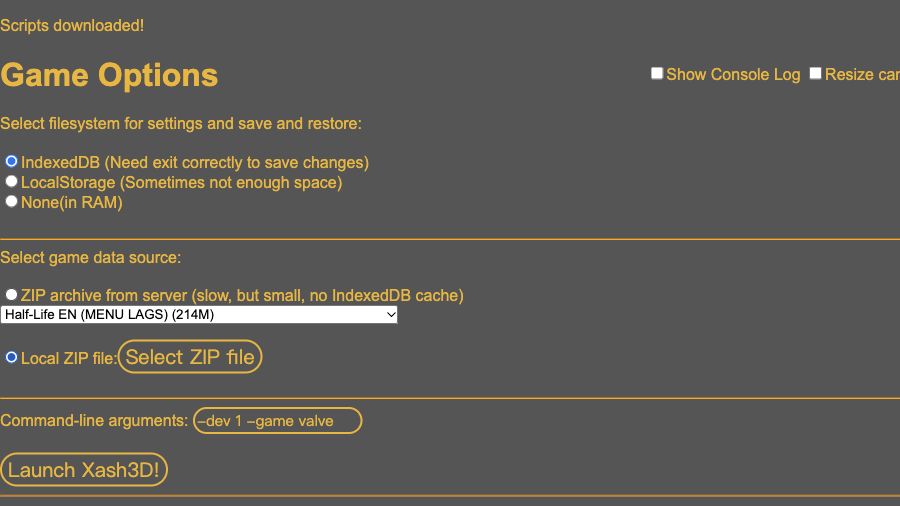
On October 15, 2026, the root entry showed memory size 150 and Start. Start opened xash.html#150, then Scripts downloaded and Game Options appeared. We inspected IndexedDB, LocalStorage and RAM storage choices, the server ZIP selector, local ZIP option and -dev 1 -game valve arguments. Selecting Local ZIP changed its radio state. We did not choose a file or press Launch Xash3D, so no gameplay, save persistence, data compatibility or controls were verified. No account or payment was requested in this setup path.
Desktop browser · Oct 15, 2026
This is the Pixelsuft frontend, not x8bitrain's WebXash page. The entries share Xash-related technology but have different visible setup paths; do not transfer WebXash folder instructions without checking this source. Listed server sizes, lag warnings and storage cautions are interface statements, not measurements or rights-clearance findings.
Current instructions on the original project (opens in a new tab)Independent editorial pick; not attributed to Radiant Optimizer.
Which Half-Life project?
This Half-Life browser guide covers Pixelsuft's Xash3D FWGS Emscripten frontend at pixelsuft.github.io/hl/. It is a separate destination from x8bitrain's WebXash, even though both expose Xash-related game-data workflows. The distinction matters when following setup instructions: Pixelsuft starts with a memory value and a Start button, then opens Game Options with storage and ZIP data-source settings. We checked that path directly, rather than copying another frontend's folder-selection guidance into this guide.
Our October 15, 2026 visit reached a setup screen, not a Half-Life menu or campaign. We left the initial displayed memory value unchanged, inspected the available settings and confirmed that selecting Local ZIP changed the radio state. We did not supply an archive or press Launch Xash3D. This guide's publication and source-review date therefore describe a requirements observation; they do not establish when the frontend first appeared, whether an archive is compatible or whether a particular game-data distribution is authorized.
Guide published . Source reviewed . Author release-page publication: Not established. The checked frontend did not provide a verified original browser-release date.
Pixelsuft's original Xash3D FWGS browser setup (opens in a new tab)Six conditions for Half-Life in browser
Game files
The initial Start action downloaded setup scripts and displayed Game Options without requiring our own files. The screen then offered a server ZIP source and a separate Local ZIP file choice. The default server selection was labelled Half-Life EN, MENU LAGS and 214M; other choices included Half-Life RUS and Opposing Force variants with size and bug warnings. These are source labels, not transfers or builds we verified. We did not start a server archive, inspect its contents or endorse its distribution. The local option was selectable, but no file was chosen. Use only data you have the right to use and consult the original instructions before launching.
Controls
Start responded and opened the next setup page, and the Local ZIP radio option changed when selected. Those are browser-form interactions, not Half-Life gameplay controls. The setup also displayed Show Console Log, Resize canvas, Lock/hide mouse pointer and Fullscreen options. We did not toggle those controls as a compatibility test, capture the mouse or enter a scene. Movement, aiming, attacks, menu shortcuts, remapping and gamepad support remain unconfirmed. The gameplay-input filter stays unknown even though the frontend's ordinary form controls responded during inspection.
Account
No sign-in, payment or account-registration prompt appeared between the root entry and Game Options. We did not use multiplayer, create a profile or follow a payment path. The account label therefore applies only to opening and inspecting setup. It is not a guarantee about later servers, linked communities, every game mode or future versions of the site. A local-data option also says nothing about a cloud account or synchronized progress. Keep these questions separate from whether you have suitable and legitimately usable game data for the runtime.
Mobile gameplay
Not tested. Our observation used a desktop browser and ordinary form input. We did not load a phone session, test a mobile file chooser, verify touch controls or compare browser storage behavior on different devices. Showing the setup screen at a small width is not evidence that the game runtime or mouse-capture workflow works on a phone. Nor did we test fullscreen, screen rotation, controller pairing or sustained graphics performance. The printed memory value should not be interpreted as a measured device-memory requirement or a recommended setting for untested hardware.
Full session
We stopped before Launch Xash3D. No Half-Life menu, map, playable character, combat encounter, campaign transition or server connection was observed. The Scripts downloaded message marks setup progress, not completion of a game-data download or entry into gameplay. Selecting a data source is likewise not a compatibility result. We did not save, exit a running game, reopen it or test restoration after a browser restart. The image on this guide deliberately shows Game Options rather than presenting the frontend as a played or completed Half-Life session.
HTTP link check
A separate request to pixelsuft.github.io/hl/ returned HTTP 200 with no redirect on October 15, 2026. Within the browser, clicking Start navigated to xash.html#150; that user-driven navigation is different from an HTTP redirect on the root URL. We did not independently check every script, archive or later runtime endpoint. A root page can respond correctly while game-data loading still has problems, and a setup warning does not itself prove the website is down. Use the exact stage and current error when comparing your own visit with this historical observation.
Storage options are warnings, not verified saves
Game Options offered IndexedDB, LocalStorage and None in RAM for settings and save/restore. Its IndexedDB label warned that a correct exit is needed to save changes; its LocalStorage label warned there may not be enough space. The server ZIP label separately said it did not use IndexedDB cache. These interface statements describe different concerns and should not be collapsed into a promise of automatic cloud saves or an offline game. We did not test any persistence option, compare capacities or clear storage. The default command-line field displayed -dev 1 -game valve; it was not edited or validated against an archive. Avoid transferring a command or folder layout from another Xash frontend without checking this entry's own instructions. Directory bookmarks are separate from all of these external game settings.
GOOD TO KNOW
Half-Life browser FAQ
Which Half-Life browser frontend is this?
Pixelsuft's Xash3D FWGS Emscripten entry. It is a separate URL and setup workflow from x8bitrain's WebXash; we did not verify interchangeable data or instructions.
Does opening setup require my own ZIP?
No file was required to reach Game Options. That screen offers server and local ZIP choices, but we launched neither. Use only game data you have the right to use.
Did you download the listed 214M Half-Life archive?
No. That value and its MENU LAGS warning were visible selector labels. We did not download, inspect or launch the archive.
Are IndexedDB and LocalStorage saves confirmed?
No. We recorded the frontend's storage options and warnings, not a save-and-restore test. No game was launched and no persistence was measured.
Did you test Half-Life controls or mobile play?
No. Start and the Local ZIP radio option responded in setup; gameplay input, mobile compatibility and a full session remain unverified.