INCREMENTAL / BROWSER PROJECT
Candy Box 2 in browser
The original Candy Box 2 entry accumulated candies and responded to Throw 10 candies on the ground. This is an opening-action check, not a completed adventure or save-recovery test.
candybox2.github.io
At a glance
- Game files
- No own files requested before candy action
- Controls
- Pointer-based controls
- Account
- No sign-in in checked entry
- Mobile gameplay
- Not tested
- Full session
- Not tested
- HTTP link check
- HTTP 200; 0 redirects (2026-10-18)
Basis: project instructions and limited desktop entry observation. Observations: Oct 18, 2026. Conditions organized: October 18, 2026.
The opening counter increased and one Throw 10 candies action produced a confirmation. No sign-in or own files preceded that path; exploration, saves and touch input remain unverified.
Source & instructions (opens in a new tab)Project type: Native browser game
The release links the matching Candy Box 2 repository and its own FAQ identifies TypeScript compiled to JavaScript. This is the original browser sequel, not a console emulator or the earlier Candy Box.
Classification organized October 18, 2026 from the recorded source and check notes; not a new gameplay test.
Before you open it
- Use the Candy Box 2 repository's linked release; the separate Candy Box link is the earlier game, not another check of this sequel
- The apparently sparse beginning displayed a live candy counter before additional action labels appeared; no own archive was requested
- The accumulating candy counter means values can change between observations; a screenshot is not a guaranteed starting balance
Getting started
- Open the linked Candy Box 2 release and allow its initial candy counter to advance. Our visit started at 0 and displayed version 1.2.3.
- When the action appeared, one selection of Throw 10 candies on the ground produced a confirmation that ten were thrown.
- We stopped at the opening interface without using the other candy actions, starting exploration or exercising any save operation.
What we checked
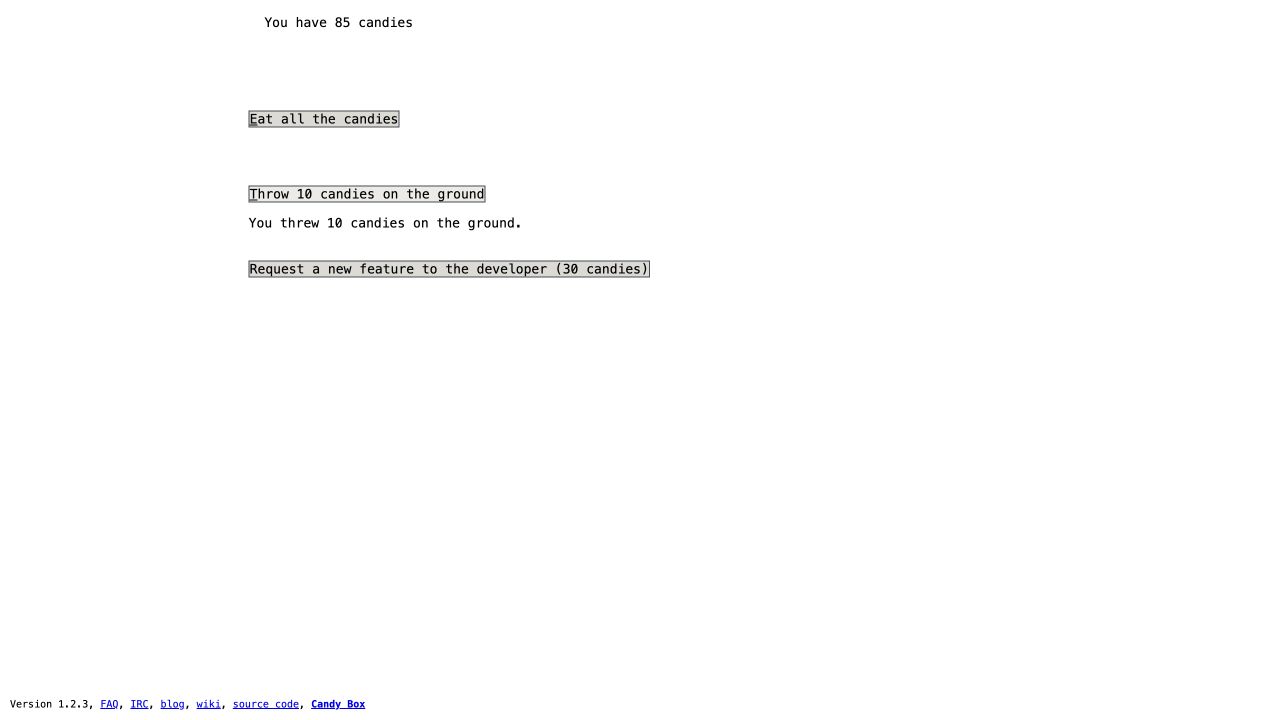
On October 18, 2026, the original entry displayed Version 1.2.3 and began at 0 candies. The count increased while the page was open. One pointer selection of Throw 10 candies on the ground produced the explicit message You threw 10 candies on the ground. The later screenshot showed 85 candies as time continued to pass. No own-file, registration or payment prompt preceded this action. We did not eat all candies, request a feature, open the original Candy Box, follow chat or donation links, explore a map, fight, reload a save or test mobile input.
Desktop browser · Oct 18, 2026
The release's own source-code link matches the reviewed repository. Its FAQ identifies TypeScript compiled to JavaScript; this is a browser project rather than a commercial-console emulator. We did not establish an exact first-publication date. The public screenshot intentionally shows the sparse interface actually reached rather than borrowing ASCII scenes from later gameplay or another site.
Current instructions on the original project (opens in a new tab)Independent editorial pick; not attributed to Radiant Optimizer.
Which Candy Box 2 project?
This Candy Box 2 browser guide covers the release at candybox2.github.io, which links its own matching source repository. The opening looked deliberately sparse: a candy counter appeared first, followed by action labels as candies accumulated. We selected the action that throws ten candies on the ground and received an explicit confirmation. That is a directly observed opening interaction, not evidence that we reached the adventure's map, ASCII scenes or combat. We keep the image and status at the point actually checked rather than illustrating later content we did not visit.
The check and source review are dated October 18, 2026. The live release displayed version 1.2.3. Candy accumulated while the page remained open, so separate observations showed different balances; the screenshot's 85 candies are not a guaranteed initial amount. We did not stop the counter to produce a repeatable benchmark or alter the game through scripts. The source's availability helps identify the project, while the successful action and visible feedback independently establish the limited gameplay response. An exact first-publication day remains unestablished.
Guide published . Source reviewed . Author release-page publication: Not established. The reviewed original repository and FAQ did not establish an exact first publication day for this browser deployment.
Candy Box 2 source repository and linked browser release (opens in a new tab)Six conditions for Candy Box 2 in browser
Game files
The checked root release opened without asking for a ROM, archive, disk image, local installation folder or imported state. We supplied no file. That separates this opening from browser ports which need an owner's commercial game data, but it does not mean the site transfers no resources. The original page was online throughout the check. No offline launch, download-size measurement, cache inventory or disconnected continuation was attempted. The source repository is for identifying the project; compiling it yourself was not part of the tested start. Tab Game Guide hosts only this explanation and an observation screenshot, not the runtime or a prepared save.
Controls
The counter began at zero and grew before we selected an action. When Throw 10 candies on the ground was available, one pointer click produced the message confirming that ten candies had been thrown. Passive accumulation continued, so the immediate and later balances need not differ by exactly ten. That is why the confirmation, not a subtraction between distant screenshots, supports this result. Eat all the candies and Request a new feature were visible but unused. We did not exercise a keyboard shortcut, later inventory control, battle command or touch gesture. The directory's pointer category describes this opening response, not every action in the complete adventure.
Account
No registration, email, password, profile or payment prompt appeared before the candy action. We did not send a feature request, email the author, join the linked chat or open the donation route in the FAQ. A label mentioning the developer was not treated as permission to communicate externally. The account condition is therefore limited to the game path actually followed. It does not describe the login requirements of a wiki, chat service or other linked destination. This directory's Save button bookmarks a guide locally; it does not preserve a Candy Box 2 run, create a game account or transfer accumulated candies.
Mobile gameplay
Not tested. Our observation used a desktop browser and pointer, not a phone, touchscreen or on-screen keyboard. Text action labels responding to a desktop click do not establish usable touch targets, a well-framed ASCII scene or later combat input on a small display. We did not test orientation, background timers, mobile storage or any separate packaged edition. Responsive checks of this guide concern the guide's headings, screenshot and links only. They should not be read as a phone gameplay result. The visited version label also does not make a compatibility statement for every device or future update.
Full session
The stop point was the opening candy screen after one throw action. No map, equipment, shop, quest, battle or ending was reached. We did not eat the remaining candies, request an interface feature, import progress, reload a saved run or test a long unattended session. Waiting long enough for labels to appear is a different observation from completing a progression milestone. The changing balance supports a live counter, but not a precise production-rate measurement or a guarantee of progress while the browser is closed. The sparse screenshot intentionally preserves this boundary rather than standing in for a completed adventure review.
HTTP link check
A separate HTTPS request to the exact candybox2.github.io root returned HTTP 200 with zero redirects on October 18, 2026. Certificate validation stayed enabled. This document result and the browser action are recorded separately: a successful document alone would not establish that candy timers initialize or controls respond. Conversely, one successful action does not validate all later resource requests, storage paths or future availability. We did not bypass an interstitial or change browser protections. If a later visit remains sparse, compare its visible counter and available actions before assuming an unvisited map failed to load.
Candy Box 2 versus the earlier Candy Box
The release links both its source and a separate Candy Box entry. We checked the sequel only and did not open the earlier game as another version of this result. The project's FAQ describes its browser implementation; that source context is not a test of every feature or a requirement to install development tools. Version 1.2.3 identifies our visit rather than asserting a universal latest release. The image is the actual opening page, not a later ASCII illustration copied from another guide. Source identification, an initial control response, and completion are three different levels of evidence; this page supplies the first two within the stated limits.
GOOD TO KNOW
Candy Box 2 browser FAQ
Which Candy Box browser game was checked?
Candy Box 2 at candybox2.github.io, linked by the matching repository. The earlier Candy Box has a separate link and was not checked in this visit.
Why does Candy Box 2 initially show so little?
Our opening began with a candy counter, and action labels appeared as it increased. We confirmed one throw action, not later exploration or a map.
Which input actually worked?
One pointer click on Throw 10 candies on the ground produced the explicit confirmation that ten candies were thrown. Other actions and keyboard or touch controls remain unverified.
Do I need an account or my own game files?
Neither was requested before the checked opening action. The original site still loaded online resources; no offline or save-recovery test was performed.
Is the complete adventure or mobile play verified?
No. We stopped at the candy screen without exploration, combat, an ending, recovered progress or a mobile gameplay check.