PLATFORMER / BROWSER PROJECT
Prince of Persia in browser: PrinceJS
PrinceJS reimplements the MS-DOS Prince of Persia in JavaScript. Return reached a dungeon scene and right-arrow input moved the character; later actions and completion remain unverified.
princejs.com
At a glance
- Game files
- No own files requested before dungeon movement
- Controls
- Keyboard controls
- Account
- No sign-in in checked entry
- Mobile gameplay
- Not tested
- Full session
- Not tested
- HTTP link check
- HTTP 200; 0 redirects (2026-10-15)
Basis: project instructions and limited desktop entry observation. Observations: Oct 15, 2026. Conditions organized: October 15, 2026.
Return reached a dungeon and short Right input moved the character without signing in or supplying files. Jumping, climbing, combat, saving, controller/mobile input and a complete level were not verified.
Source & instructions (opens in a new tab)Project type: Browser port
The maintainer describes an HTML5/JavaScript reimplementation of the MS-DOS Prince of Persia. A dungeon and short keyboard movement were checked; this is not a tested general-purpose DOS emulator.
Classification organized October 15, 2026 from the recorded source and check notes; not a new gameplay test.
Compare classic browser portsBefore you open it
- The checked default start loaded online resources without asking for an owned-game archive; this is not offline or no-download verification
- The maintainer documents cursor keys and Shift, plus other input options; only starting and short rightward movement were checked
- This is the specific PrinceJS project, not an official publisher release or a general-purpose DOS emulator
Getting started
- Open princejs.com and wait for Press to Start. Our desktop check used Return, held briefly, to enter the dungeon.
- Click the game area if keyboard focus is elsewhere. A short Right input moved the character on the starting platform in our check.
- Read the maintainer's controls before attempting later actions. We did not test jumps, ledge grabs, sword fights, saving or level completion.
What we checked
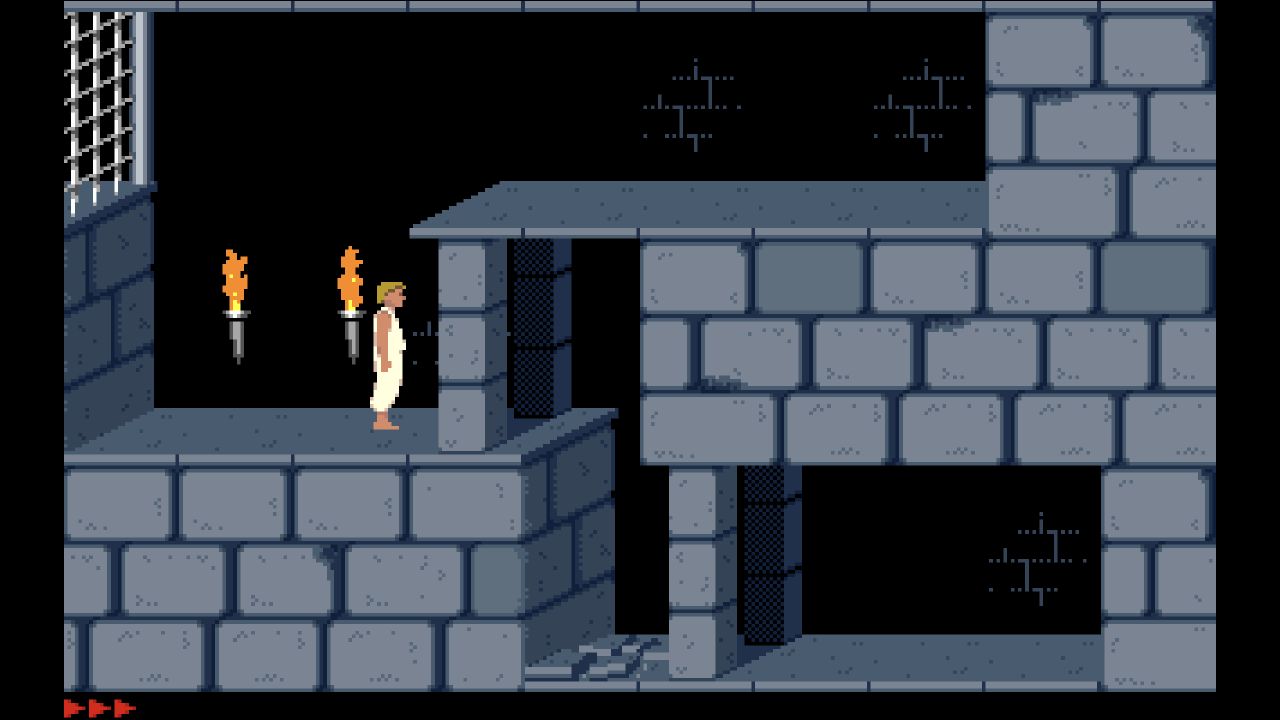
On October 15, 2026, the original PrinceJS entry showed Press to Start. A held Return input reached a dungeon scene with torches and three health markers. Holding Right for 250 ms moved the prince across the starting platform. No account, payment or own-file upload was requested through that movement check. We did not verify jumping, climbing, sword combat, timer behavior, saving, later levels, mobile controls or completion.
Desktop browser · Oct 15, 2026
The maintainer describes an HTML5/JavaScript reimplementation of the MS-DOS game and credits earlier PrinceJS work and Jordan Mechner. The browser entry is not evidence of publisher authorization or a distribution-rights audit. Custom-level conversion instructions are separate from the default path checked here.
Current instructions on the original project (opens in a new tab)Independent editorial pick; not attributed to Radiant Optimizer.
Which PrinceJS project?
This Prince of Persia browser guide covers PrinceJS at princejs.com, the deployment linked by oklemenz's maintainer documentation. That source describes an HTML5 and JavaScript reimplementation of the MS-DOS game. The platform field identifies that documented source game; it does not claim the website is a general-purpose DOS emulator or that every Prince of Persia release works there. We reached a dungeon and confirmed short rightward movement, rather than inferring gameplay from an illustration or a successful website response.
The actual check and this guide are dated October 15, 2026. The familiar original game's release history is not a first-publication date for this particular browser deployment, and the repository's continued maintenance is not a newly released game announcement. We keep the source-publication field unestablished instead of replacing it with our own review date. Our screenshot is an observed game scene, not a promotional rendering, while the account, file and input labels describe only the limited path we actually followed.
Guide published . Source reviewed . Author release-page publication: Not established. The reviewed maintainer documentation did not establish the first publication date of the checked browser deployment.
PrinceJS maintainer repository, credits and controls (opens in a new tab)Six conditions for PrinceJS in browser
Game files
The default entry did not ask for an archive, disk image, installation folder or upload before the dungeon appeared. We supplied no local game data and did not follow custom-level preparation instructions. The browser still fetched the project's online resources; no local-file request does not mean zero download, a self-contained offline application or permanent availability. This directory provides neither the game runtime nor replacement asset packages. We did not inspect the deployment's complete resource inventory, audit asset distribution rights or verify that a different hosted build uses identical data. Use the maintainer's default entry when comparing with this check.
Controls
The entry initially displayed Press to Start. Brief input attempts did not establish a reliable launch immediately; a Return input held for 250 milliseconds subsequently reached the dungeon. A short Right hold of the same duration moved the prince along the starting platform, with the changed position and running pose visible in the scene. The maintainer lists cursor keys, Shift for context actions, Space for time and Enter for continuing, but we did not validate that entire map. Jumping, crouching, ledge grabs, sword actions and remapping remain unchecked. A confirmed direction key is narrower than a verified complete control scheme.
Account
No registration, password, payment or account-selection step appeared before the recorded dungeon movement. We did not create a profile, submit personal information, open a support community or investigate every link in the repository. The account category therefore means not requested along this default start, rather than a guarantee about all deployments or later services. Tab Game Guide's Save button is a local directory bookmark and does not create a PrinceJS account or preserve the prince's progress. Removing that bookmark also does not clear the external game's browser data or reset a run.
Mobile gameplay
Not tested. The maintainer documents additional input arrangements, including mobile and controller-related options, but this check used a desktop browser and keyboard. We did not touch an on-screen control, pair a gamepad, rotate a phone, inspect mobile audio behavior or test simultaneous actions. The guide's ability to fit a narrow display is not evidence that the external game has usable touch input. Likewise, a large desktop scene does not establish a sustained frame rate on another device. Treat those source descriptions as instructions to evaluate, not compatibility results from this guide.
Full session
The confirmed scene contained a starting platform, torches, gates and three red health markers. We moved a short distance to the right and stopped before testing an obstacle or completing a room. No jump sequence, fight, potion effect, timer outcome, level transition or ending was verified. We did not test saving, restoring, URL-based state descriptions, a repeated launch or any custom level. The screenshot supports the claim that a rendered dungeon and basic movement were reached; it does not establish that all levels are present, that progress persists or that a full playthrough can finish.
HTTP link check
A separate HTTPS request to princejs.com returned HTTP 200 with zero redirects on October 15, 2026. Certificate validation remained enabled. This root-page check is separate from the browser observation of actual movement, and neither substitutes for the other. A healthy document response cannot verify each resource, another browser, a saved run or future service availability. If a later visit stays at the start prompt, distinguish focus and launch input from an unavailable website instead of treating all failures as one issue. We did not characterize load speed, bandwidth consumption or long-term reliability from this single visit.
Which Prince of Persia browser version is this?
PrinceJS has its own maintainer, documentation, credits and deployment. Those are more precise identifiers than a bare game name in a directory or social post. The documentation credits earlier PrinceJS work and Jordan Mechner; that does not make this an official publisher-operated service. Its custom-level and URL-parameter sections describe options beyond the default route checked here. We did not turn each level or configuration into another project page, import content or promise that a copied configuration restores progress. For troubleshooting, begin with the named project and the exact visible state: Press to Start, a dungeon, or a later action that has not been tested. Our classification describes a reimplementation of a PC game, not a newly validated emulator platform.
GOOD TO KNOW
PrinceJS browser FAQ
Which Prince of Persia browser project was checked?
PrinceJS at princejs.com, linked by oklemenz's maintainer repository. The source identifies an HTML5/JavaScript reimplementation of the MS-DOS game, not a general-purpose DOS emulator.
Do I need to supply my own game archive?
No archive or installation folder was requested before our default dungeon movement check. The project still loaded online resources, and we did not test custom levels or offline play.
Which PrinceJS inputs actually worked?
A held Return input reached the dungeon and a short Right input moved the character. Other documented keys, jumps, climbing and sword actions were not verified.
Does the check prove every level can be completed?
No. We stopped on the initial platform after basic movement, without completing a room, level, fight or full session.
Are mobile controls and saving confirmed?
No. The maintainer documents additional options, but our desktop check did not test touch, controllers, save recovery or repeat loading.