PLATFORMER / BROWSER PROJECT
Space Huggers in browser
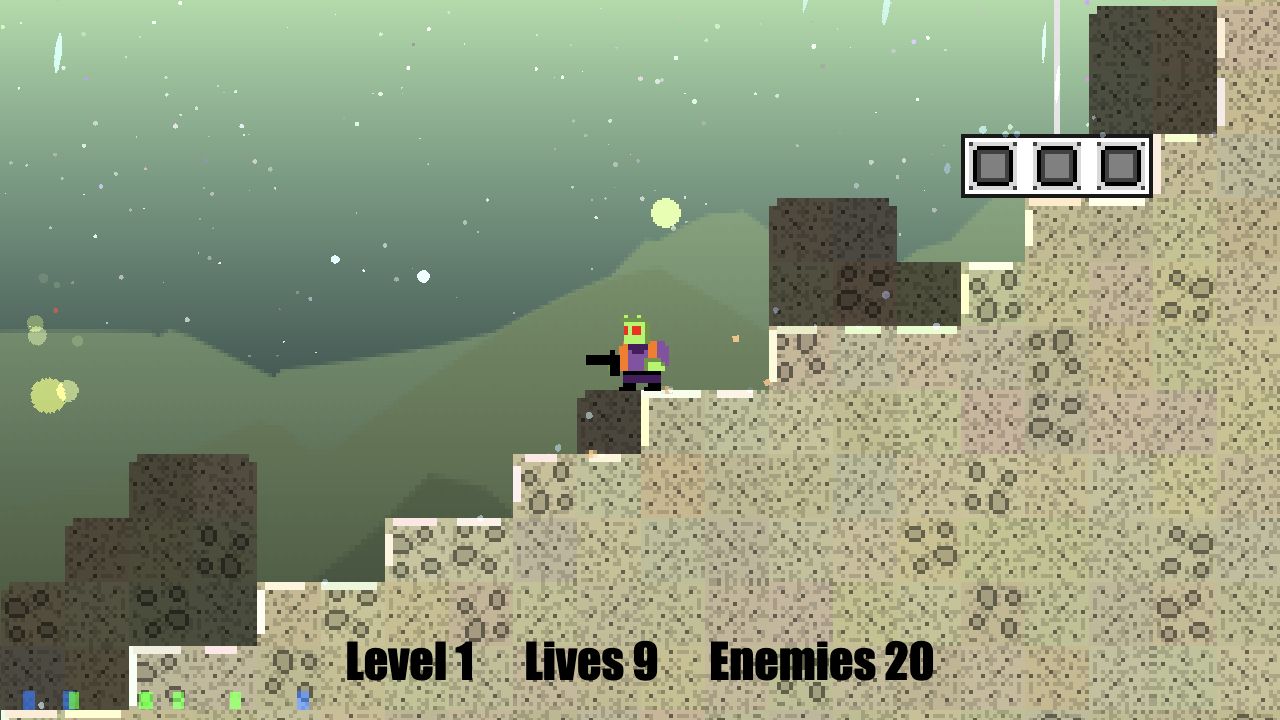
Frank Force's browser platform shooter reached Level 1 and responded to leftward movement and Z shooting. The view showed nine lives and twenty enemies; missions, co-op, saving and mobile remain unverified.
killedbyapixel.github.io
At a glance
- Game files
- No own files requested before movement and shooting
- Controls
- Keyboard controls
- Account
- No sign-in in checked entry
- Mobile gameplay
- Not tested
- Full session
- Not tested
- HTTP link check
- HTTP 200; 0 redirects (2026-10-20)
Basis: project instructions and limited desktop entry observation. Observations: Oct 20, 2026. Conditions organized: October 20, 2026.
A short A input moved left and Z produced a visible shot without sign-in or own files. No enemy defeat, completed mission, controller/co-op, save restoration or mobile session was checked.
Source & instructions (opens in a new tab)Project type: Native browser game
The creator's source identifies an original JavaScript platform shooter and supplies the checked demo URL. Competition and Newgrounds builds are separate entry paths, not additional games verified by this observation.
Classification organized October 20, 2026 from the recorded source and check notes; not a new gameplay test.
Before you open it
- Use the case-sensitive SpaceHuggers demo linked by the original repository, not a mirror or another competition build
- The README lists WASD/D-pad movement and Z or left-click shooting; only A movement and keyboard Z shooting were verified
- Local co-op and controller support are source descriptions, not tested multiplayer or gamepad results
Getting started
- Open the repository-linked browser demo and read the current scene and counters.
- Our short A input moved left and Z produced a shot. Other movement and combat bindings are documented by the author but were not exercised.
- Stop interpreting this check at the opening Level 1 action: it did not finish a mission, defeat a verified enemy or test co-op, saving or touch controls.
What we checked
On October 20, 2026, the author-linked GitHub Pages demo opened a Space Huggers scene labelled Level 1, Lives 9 and Enemies 20. Holding A for 250 milliseconds moved left relative to the checkpoint and terrain. Holding Z for 200 milliseconds produced a visible shot to the left; a later brief Z input was also exercised. We observed no defeated enemy and the recorded counter remained Enemies 20. No own files, account or payment preceded this path. Jumping, climbing, roll, grenades, controllers, co-op, mission completion, saves and mobile were not tested.
Desktop browser · Oct 20, 2026
The repository describes an original JavaScript platform shooter and asks that the game not be redistributed. This guide links to the creator's destination and hosts only its notes and our own screenshot, not game code or an embedded copy. Its local co-op description is not online play, and the displayed life count is not evidence that ten lives were tested or a save was recovered.
Current instructions on the original project (opens in a new tab)Independent editorial pick; not attributed to Radiant Optimizer.
Which Space Huggers project?
This Space Huggers browser guide covers the GitHub Pages destination linked by Frank Force's original SpaceHuggers repository. It is an original JavaScript platform shooter, not a console game running through a general-purpose emulator. The scene opened at Level 1 with a checkpoint, terrain, a character and counters reading Lives 9 and Enemies 20. A short A-key input moved left relative to the checkpoint and surrounding terrain. A subsequent Z input produced a visible shot, establishing a narrow pair of desktop keyboard actions.
The source review and browser observation took place on October 20, 2026. We did not select another build, join an online session or connect a controller. The author's repository also links Newgrounds and a competition release; those destinations are not extra projects verified by this single observation. The recorded scene still showed twenty enemies, with no enemy defeat established. Its nine-life display is a screen reading, not proof of how many deaths occurred, a recovered save or completion of any mission.
Guide published . Source reviewed . Author release-page publication: Not established. The inspected source and live demo did not establish the exact first-publication date of this browser deployment.
Frank Force's original SpaceHuggers repository, controls and demo link (opens in a new tab)Six conditions for Space Huggers in browser
Game files
No visitor-supplied archive, disc image, commercial installation or ROM was requested before movement and shooting in the demo. The original site provided its browser resources. The repository's size and competition descriptions are not measurements of our full transfer or confirmation of offline play. We installed no development tool, loaded no private file and compiled no replacement build. The source asks that the game not be redistributed, so this directory links its own hosted destination and publishes only explanatory notes and our check screenshot. We do not embed a copy, mirror the runtime or distribute its asset files.
Controls
The README lists WASD or D-pad movement, Z or left-click shooting, X or middle-click roll, and C or right-click grenade. We exercised A for 250 milliseconds and observed leftward movement, then Z for 200 milliseconds and saw a shot to the left. A later brief Z input was also sent. Other movement directions, jumping, climbing, roll, grenades and mouse shooting were not tested. The filter records keyboard input because the actual responses used keyboard actions. It does not certify the whole printed binding list, controller mappings, multiplayer input or advanced movement combinations.
Account
No account, password, personal name or payment was requested before the checked Level 1 actions. We did not connect a profile, submit a score or use a linked community service. The repository describes local co-op, which should not be rewritten as an observed online multiplayer lobby or a requirement to create an external room. We tested neither local co-op nor a second player. This account field applies only to the direct demo's opening path. Saving the guide locally in this directory does not create a game identity, preserve a mission or store the external player's remaining lives.
Mobile gameplay
Not tested. The observation used desktop A and Z keys. Although the source discusses several input systems, no phone, touch overlay, virtual keyboard or paired gamepad was exercised. A successful screenshot of a responsive guide cannot establish the external game's mobile movement, shooting, landscape layout or simultaneous-button handling. We did not compare browsers, inspect battery usage, verify audio interruptions or run a sustained performance test. Treat controller and touch support as separate source claims needing their own checks, not as conclusions inferred from a keyboard shot or the engine's general input capabilities.
Full session
The check stayed in the opening Level 1 area. No enemy defeat, cleared objective, complete mission, next level, checkpoint recovery or restored save was established. The counter remained Enemies 20 in the recorded scene even though shooting responded. A visible projectile therefore confirms firing, not a hit or a reduction in enemies. We did not count deaths, spend all lives or use R to restart. The source's broader progression and destruction descriptions are not a full playthrough result. The guide keeps its session limitation explicit rather than describing a rendered battlefield as a completed game.
HTTP link check
A separate HTTPS request to killedbyapixel.github.io/SpaceHuggers/ returned HTTP 200 with zero redirects on October 20, 2026. The capitalization matches the original repository's demo link, and certificate validation stayed enabled. That document response is distinct from the actual A and Z observations. It does not verify another release, every procedural level, controller input or a later visit. We did not bypass a warning, install a browser plugin or change game state through injected code. When comparing a future check, use the same entry and distinguish availability from rendered scene, basic control response and mission completion.
Local co-op and alternate builds are separate checks
The original documentation describes multiple local players and controller support. Neither feature was exercised here, and local co-op should not be confused with internet matchmaking. We did not create or join a public or private room, contact another player or attach a controller. Similarly, the linked Newgrounds and competition builds may differ from the repository's direct demo; this page does not transfer its keyboard result to those destinations. The practical takeaway is narrower and reproducible: the direct demo rendered a first level, a short A input changed the character's position relative to the terrain, and Z produced a shot. Nothing in that sequence proves that a mission can be completed, a checkpoint restored or an existing run resumed after closing the browser. Keep the source's gameplay tips separate from the actions actually observed, especially when deciding whether to use an advanced jump, roll or grenade combination.
GOOD TO KNOW
Space Huggers browser FAQ
Which Space Huggers browser release was checked?
The GitHub Pages demo linked by Frank Force's SpaceHuggers repository, not its separate Newgrounds or competition entry.
Which controls actually responded?
A short A input moved left relative to the terrain, and Z produced a shot. Other directions, jump, roll, grenades and mouse shooting were not tested.
Did you defeat an enemy or complete Level 1?
No. The recorded scene still showed Enemies 20. A visible shot is not evidence of a hit, mission completion or progression.
Was an account or my own game data required?
Neither was requested before the checked movement and shooting. No name, score or payment was submitted.
Were local co-op, controllers, saves or phone controls tested?
No. Those features need separate checks. We tested a single desktop keyboard path and did not create or join any external room.